


Review: The OnePlus Pad Go 2 looks a lot like an iPad, but its not quite as powerful
iPads are not the end-all be-all of tablets. There’s a wide world beyond iOS, and Android tablets are just as suitable for all your streaming and work needs. OnePlus, purveyor of Android smartphones and smartwatches, also makes tablets.
The brand’s latest, the OnePlus Pad Go 2, is a tablet under $500. On the surface, it looks a lot like Apple’s iPads, but how do they compare under the hood? Well, that’s where the differences come to light.
I tested the OnePlus Pad Go 2, a tablet for students and creatives alike, to see how it stacks up.
OnePlus Pad Go 2 specs and price
Credit: Samantha Mangino / Mashable
The OnePlus Pad Go 2 is the brand’s approachable tablet. It doesn’t quite have the computing power and memory we’d expect in a laptop, but it still has more than you’ll get in a phone.
Price: $399.99
Processor: MediaTek Dimensity 7300-Ultra
Memory: 8GB RAM
Storage: 128GB ROM
Display: 2.8k resolution, 900 nits brightness, and 120Hz refresh rate
Ports: 1 USB-C port
Camera: 8MP front and rear camera
Audio: 4 speakers
Ideal interface for those switching over from iOS
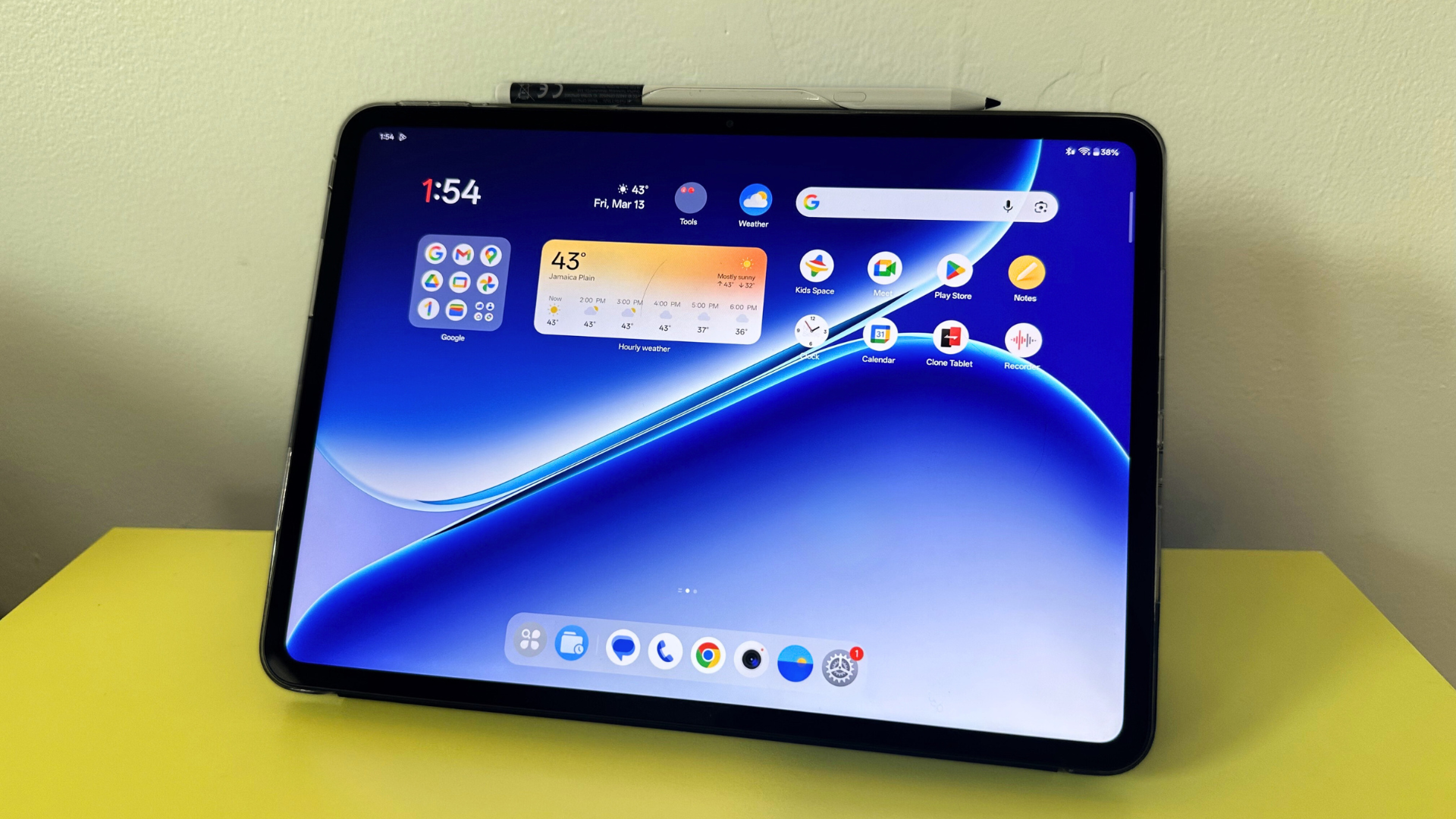
After testing a variety of Android tablets, I declare the OnePlus Pad Go 2 the most iPhone-user-friendly. Upon turning on the OnePlus Pad Go 2, I was pleased to see how familiar the home screen looked, with its widgets and sleek display. The biggest difference is that Apple uses square app icons, while OnePlus tablets use round ones. The gestures are essentially the same, too, pulling down to access menus or swiping up to close apps.
Compared to other Android tablets I tested, it felt far more intuitive. It’s not quite fair to credit it only for being similar to iOS, since the OnePlus Pad Go 2 has plenty of features that iPads don’t. On the bottom app bar on the Pad Go 2, there’s a directory so you can quickly browse your apps alphabetically rather than swipe through all your display pages.
Split screen feature is lacking
Credit: Samantha Mangino / Mashable
The hot feature on tablets is multi-window displays — now available on iPads and Samsung Galaxy Tabs. Rather than true adjustable windows, on the OnePlus, you can use split-screen displays that split the screen in half, though you can slide the divider to adjust the split. What you can’t do is move organic windows around to create a fully customizable workspace.
You can also use OnePlus’s floating window feature; however, the windows still lock to one side of the screen, so you don’t have total freedom to move them around. The OnePlus Pad Go 2’s split-screen function is good in a pinch, but not quite as usable as other tablets’ multi-window functions.
High-quality streaming with just OK speakers
Credit: Samantha Mangino / Mashable
I spent a lot of time streaming on the OnePlus Pad Go 2; it became my companion while I was working or cooking in the kitchen. I was never once disappointed by the streaming quality. It’s a quick processor that never buffers, leaving me on an unintended cliffhanger. Its 2.8k resolution and 900 nits of brightness result in clear, bright picture quality.
What I was less impressed with on the OnePlus Pad Go 2 was its speakers. The tablet has four speakers, but I found the audio wasn’t very flattering. It sounded similar to a smartphone speaker, mostly clear but a little fuzzy and tinny.
Disappointing computing power
For daily use, I found the OnePlus Pad Go 2 to be a speedy, well-equipped device. It loads pages easily and requires very little buffering. I expected it to be on par with the Apple iPad with the A16 chip, but I was surprisingly disappointed.
On the Geekbench 6 test, the OnePlus Pad Go 2 scored 3,030 in the multi-core test. That’s less than half of the iPad’s score of 6,233. That score isn’t weighing the Pad Go 2 down; for light activities like streaming, reading, mobile games, and internet browsing, it has plenty of power. But I wouldn’t use this tablet for photo or video editing or any other high-demand tasks.
Extensive battery life
One of the most impressive features of the Pad Go 2 is its battery life. Performing a battery rundown test, it lasted 13 hours and 57 minutes. That’s an impressive amount of time, meaning you won’t have to charge it every day, and it can keep you company on long-haul flights.
The cameras aren’t flattering anyone — human or animal
Credit: Samantha Mangino / Mashable
Credit: Samantha Mangino / Mashable
I’m only side-eyeing you a little if you’re taking photos with your tablet. But hey, there’s a time in the place. The front and rear cameras on the OnePlus Pad Go 2 leave a lot to be desired. I know it’s winter, but when I took a selfie, I felt pale and washed out. The rear camera isn’t any better. I went to take a picture of my pup, Milly, and I found it didn’t do her much justice — the photo still came out washed out and grainy.
Should you buy the OnePlus Pad Go 2?
Credit: Samantha Mangino / Mashable
The OnePlus Pad Go 2 is a pretty good tablet. For basic tasks, it performs well. I had no trouble while using it for streaming and browsing. For a budget Android tablet, it definitely gets the job done. That said, there’s still room for improvement with its camera, computing power, and speaker.
I do recommend the basic iPad over the Pad Go 2. It’s nearly identical in shape and interface; however, it has a higher Geekbench 6 score and is $50 cheaper (and often on sale for even less).
But if you’re not down with iOS, the Pad Go 2 is a comparable, although less powerful, Android option.
Mashable